

Navigation
Navigation path: Navigate to Employees -> Skills and select the Skill scale management tab
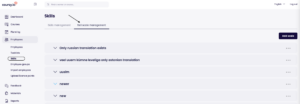
Creating new scale
Adding scale
- To add a new scale – use the “Add scale” button
- In the pop-up that opens, you are able to enter the name of the scale along with the proficiency level values
- At least 2 levels are needed to save the scale
- Maximum of 10 levels can be defined for every scale
Defining each level
- Level values are used to define the skill proficiency for the user
- To add a level – use the “Add level” button
- To delete a level – there is a trash bin icon next to the row, which needs to be used
- The initial level can not be deleted
- The points values displayed adjacent to the values can not be changed and are used later on to generate graphs and other visual content based on skill proficiencies
- Disclaimer: the graphs are not available yet
- Level values can be rearranged by dragging
- The level values should represent the proficiency of the skill as best as possible. (e.g., “Level 1: Novice,” “Level 5: Expert”)
- Note that the points values are displayed automatically along with the level value, so you do not need to enter additional numeric reference in the level names
- Also note that for each skill a separate description can be entered for the proficiency level so the name should rather be shorter than longer
Translations
- Each scale and proficiency level can be translated into all available languages
- Only languages that are marked as “Enabled” are displayed in Coursy. Feel free to add content to other languages as well but the translations will not be seen by the users when the translation is not enabled
- Only enable the languages you intend to use
- The amount of levels is the same for all languages!
Editing and deleting scale
- To edit a scale – use the “three dot” menu
- ON the edit screen – all translations and values can be edited
- NB! Editing values can affect more than one skill!
- When scale has been connected to skill and skill is connected to user/course then proficiency levels can not be added or removed
- The rearrange option is still available though
- Deleting a scale is possible from the skill scale list by using the “three dot” menu on the specific scale
- NB! Be careful when deleting skill scales since this action CAN NOT BE reversed
- NB!! Deleting skills is possible even when the skills are connected to users/courses so be EXTRA careful when deleting something!