

Navigation
Navigation path: Navigate to “Employees” -> “Skills” and select the “Skills management” tab
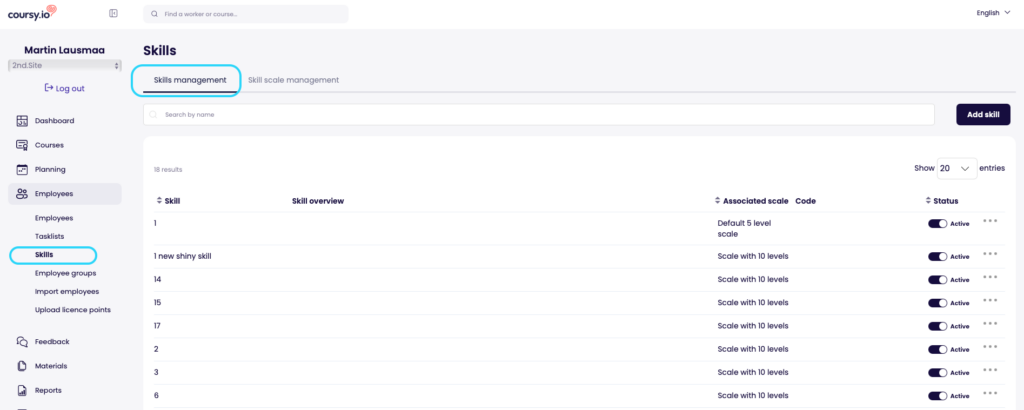
Creating new skill
Adding skill
- To add a skill – use the “Add skill” button
- In the pop-up that opens, you are able to define the name of the skill along with the following values
- Description
- Used to describe the skill internally and not displayed to learner
- Associated scale
- Choose the correct scale from existing proficiency scales
- Each scale comes with its unique proficiency levels and defines how the skill is measured
- Code
- Used when the skill is transferred from HR system or similar. Do not fill if in doubt
- Status
- Set to active by default. No need to change that just yet
- Fixed proficiency level
- Use this if you want to define one fixed requirement for the whole company. For example – the whole company need to be experts in excel. Otherwise leave it as it is and define the requirement based on individual users
- Description
Defining scale values
- For each skill you are able to define what the scale proficiency levels mean for the specific skill
- For each proficiency level from the associated scale a separate description can be added. This description is displayed to users all over Coursy and helps to define what the level means for the specific skill
Translations
- Each skill can be translated into all available languages
- Languages that are marked as “Enabled” can only be displayed in Coursy. Feel free to add content to other languages as well but the translations wont be seen by the users when the translation is not enabled
- Only enable the languages you intend to use
Editing and deleting skill
- To edit a skill – use the “three dot” menu
- IN the edit screen – all translations and values can be edited
- NB! Editing values can affect more than one user!
- Deleting a skill is possible from the skill list by using the “three dot” menu on the specific skill
- NB! Be careful when deleting skills since this action CAN NOT BE reversed
- NB!! Deleting skills is possible even when the skills are connected to users/courses so be EXTRA careful when deleting something!